No Music Playing
Start your musical journey by discovering amazing songs and artists
Player settings
Loading devices…
No output devices found. Use a supported browser (e.g. Chrome) for device selection.
Names may show as "Output 1", "Output 2" unless this site has microphone access.
After a fatal crash
Off-topicOk! so, he's back online! I lost almost everything but uhm.. That's ok, actually (don't know if this is posted in the right place.. but if it's not, I'll repost it elsewhere)
I'm worried about my soundcard tho.. The thing is, it's an AC'97 card, but it won't work. There's another thing, @ "other" (in hardware) it says "PCI device" but we have absolutely no idea what it should be
whatever it is, it fucks up my soundcard.

and these are the specs: Intel Pentium 4 3.0 Ghz met 800 MHz FSB 512 MB DDR400 dual channel geheugen ATI Radeon 9800 XL 128 MB SDRAM Pioneer dual standaard DVD-rewriter Sony 16x DVD-ROM 802.11g 54 Mbit Wireless LAN Seagate 160 GB harde schijf 7 x USB 2.0 1 x FireWire (voor), 1 x FireWire (achter) Ethernet Modem TV-kaart 6-kanaals geluid Afstandsbediening
And DON'T tell me to insert the reboot cd because we tried that like.. a billion times already and nothing works, and I bet it's because my comp doesn't know what kind of device it is (I don't know it either, by the way)
Any help? cheers
Replies
install the drivers that come with your motherboard :)
could be a chipset etc...
AC'97 is an audio codec that comes with most soundcards... indeed, your soundcard or motherboard drivers are not installed...
I tried to install the chipset drivers and the drivers for the soundcard.. (are there drivers for the motherboard??)
Originally posted by : Rude (are there drivers for the motherboard??)
worst case scenario: if u don't know what motherboard u're having and u don't have a cd-rom with driverz, try downloading Aida32 or something alike, it will tell u what's inside... then u can download driverz from website... good luck!
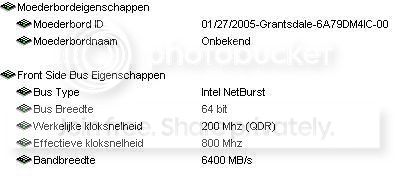
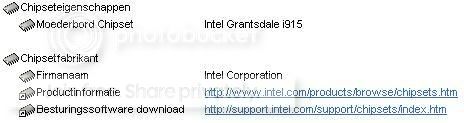
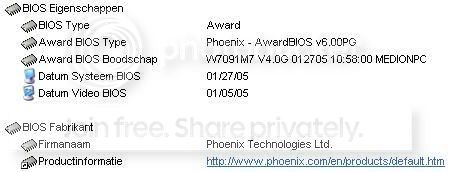
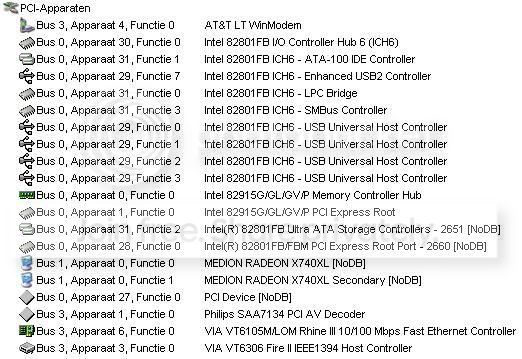
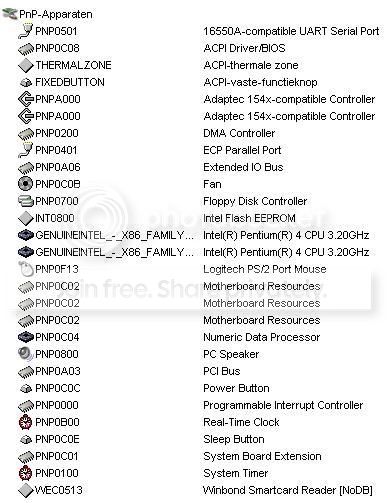
well unfortunetely, i don't see "motherboard fabrikant" which is most important in this case... "motherboard name: onbekend" is also very strange (maybe too new for aida?).
 so, i've googled "intel grantsdale drivers", but these are mainly chipset drivers because you will find this chipset on differents braches of motherboards like Asus ASD770 etc.
therefor, i'm not gonna advice u 2 install chipset drivers, because i believe what u need are sound-drivers (like AC'97), so u realy have 2 find out what motherboard u have inside if the soundchip is on your motherboard that is, because: looking at your 1st post, i have the intention that u use a PCI-soundcard or maybe the exclamation mark at the PCI-device is marking some other device... i mean, i can't watch inside your computer from here...
even u have sent a lot of info, it is not clear wether your sound is onboard or is a seperate PCI-soundcard. so try 2 find out the branch or name from your motherboard or soundcard...
ps. just had the idea of googling "grantsdale 6A79DM4IC-00" and this gave better results. seems you have a Medion laptop, right? so that's hard 2 open and look... i see they've used mainly MSI-motherboards, a few Intel and Asus...
finally i googled "grantsdale 6A79DM4IC-00 01/27/2005" and this gave me a list of links where i found ppl with the same problem, please check them yourself, because i don't have all the time in the world, u know... some things u just have 2 learn the hard way...
no, sorry, it's not the laptop, it's the titanium one.. wait I think it was the MEDION Titanium MD 8080 XL
Originally posted by : Rude no, sorry, it's not the laptop, it's the titanium one.. wait I think it was the MEDION Titanium MD 8080 XL
well, then i would open the case-side (u lose your garantee tho') and check what's inside. f.i. is there MSI written on the motherboard? do i see a soundcard in a PCI-slot? just try 2 get branchnamez and download driverz 4 it... good luck again...
and rude, any luck so far?
aida32 might recognize the soundcard, check multimedia/pci-pnp audio...
if you managed to assure the pci-device is your soundcard and when you have downloaded the corresponding driver(s), best install them through 'apparaatbeheer'.
doubleclick pci-device with the exclamation mark or question mark to get in 'eigenschappen', choose tab 'stuurprogramma', then 'stuurprogramma bijwerken'... browse to the driver...